Connect the Shuffl app to Slack, approve new permissions, and know what works on the web without it.
For Workspace administrators
Have your agent do thisPaste the prompt into Claude Code, Cursor or another agent. It follows this guide over MCP and asks before it changes anything others will see.Show the promptHide the prompt
Help me with "Connect Slack" in my Shuffl workspace.

1. Read the guide: https://shuffl.ai/docs/markdown/slack
2. Add Shuffl's MCP server: https://shuffl.ai/api/mcp
   Claude Code: claude mcp add --transport http shuffl https://shuffl.ai/api/mcp
   When the browser opens, choose my workspace and allow the access the guide needs.
3. Work through the steps in order: Connect Slack. Do what you can over MCP and tell me which steps only I can do in the browser or in Slack.

Show me what you will change and who it affects, and wait for my yes before publishing, inviting or sending anything.
On this page▾
App links open your signed-in workspace. Check the selected workspace before making changes.
Connect Slack
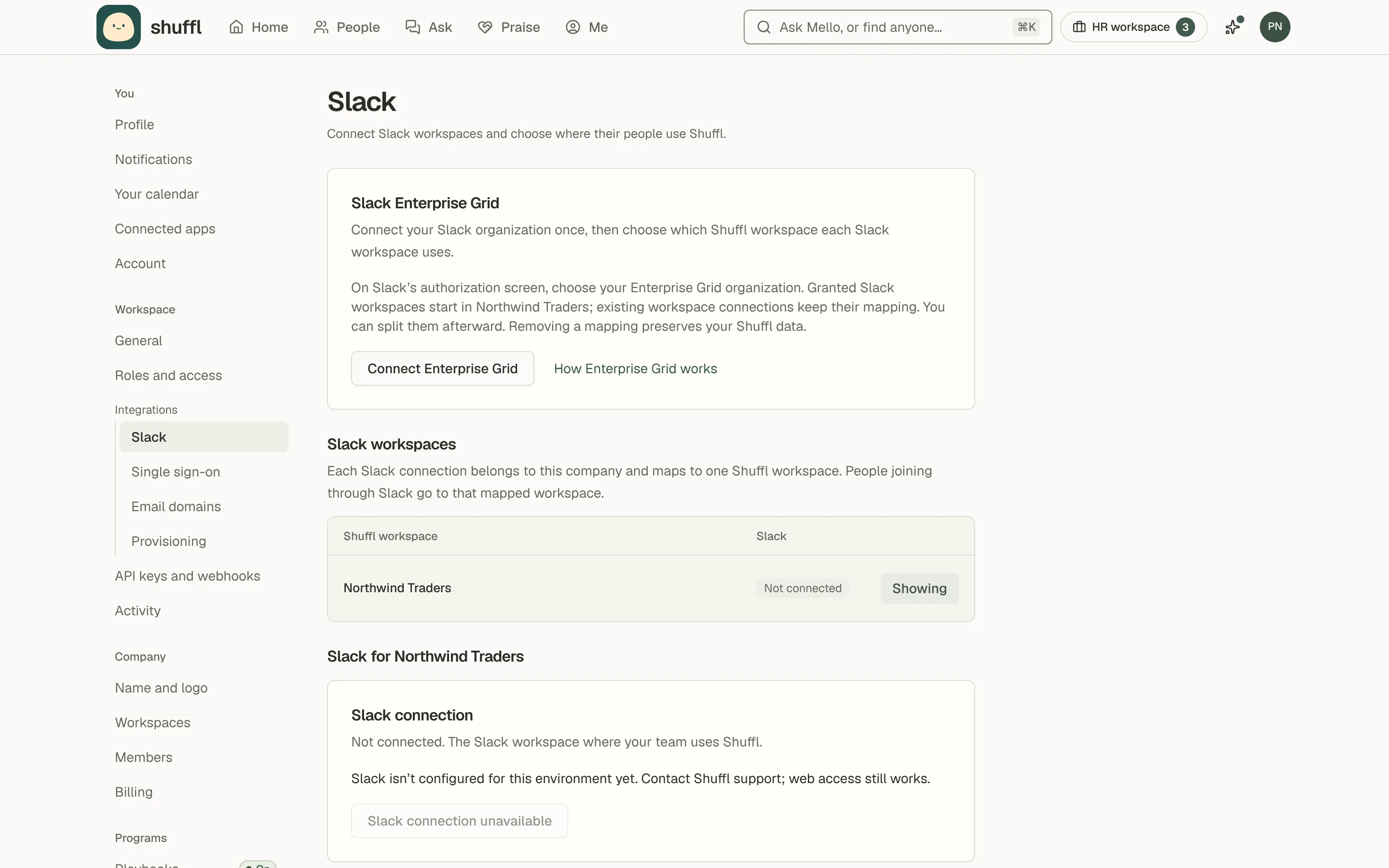
As a company owner or administrator, open Settings → Workspace → Integrations → Slack.
Choose Manage on the Shuffl workspace’s row, then Connect Slack. A Slack owner or administrator may need to approve the app.
Shuffl reads messages sent to it, @Shuffl mentions and its own threads, and the member list with email addresses.
It also reads the praise channels an administrator picks, with up to 365 days of history, and no other channels. Privacy and data lists everything it reads.
Everyone in your Slack workspace, and anyone who joins later, appears in People waiting for access; bots, guests and deactivated accounts are left out.
Titles and time zones come from Slack profiles.
The person who connected Slack gets a welcome message with setup as a checklist. Send me the welcome again on that page resends it.
Shuffl is listed on the Slack Marketplace, where Slack admins can review the app and the permissions it asks for. Connect from Shuffl’s Slack settings so the app joins the right Shuffl workspace.
Each Slack connection belongs to a company. Enterprise Grid lets you connect the organization once and map its Slack workspaces to Shuffl workspaces; newly granted ones wait for a company administrator to map them.
Welcome for whoever installs ShufflThe person who connects Slack, in a DM from Shuffl · Right after Slack is connected
ShufflAPP
Welcome to Shuffl
Mello answers your team’s HR questions in Slack.• Only from the Knowledge you approve• Anything it can’t answer goes to HR privately
Set up Shuffl 2 of 4 done▰▰▰▰▰▱▱▱▱
✅ Connect Slack✅ Add your handbook so Mello answers with sources▫️ Ask Mello a test question▫️ Invite a coworker
Finish setupOpen Home
Ask Mello• Send a message here• Or mention @Shuffl in a channel
Try “How much PTO do I get?”
This chat is private. Your manager, HR and workspace admins can’t read it, and it’s deleted after 30 days.
Settings → Workspace → Integrations → Slack shows the connection state and every setting that depends on it.
When a feature needs a new Slack permission, Manage shows Slack needs updated permissions and what the reconnect turns on. Choose Reconnect Slack and approve it; nothing else changes.
The Slack settings page shows the same state on the connection card: Connected, Connected, permissions needed, Reconnect required or Not connected.
What employees see in Slack
The Shuffl app’s Messages tab is a private chat with Mello. Its Home tab leads with For you, the same list as Home on the web, three at a time.
Then come Today’s question, your people (buddy, mentor, latest introductions, people to meet), praise with its change and newest badge, and teammates’ days this week.
Managers also see their new hires’ 30/60/90 plans. Administrators see overdue Pulse actions and hires falling behind under Waiting on you, and Pulse answers as a bar with the change since the last question.
HR responders, Knowledge verifiers and administrators see a count of what waits on them first, then HR requests and Knowledge to review. Administrators also get Your workspace, with setup progress, Pulse participation and buttons to People, Praise and Settings.
Each employee gets one welcome message when their access is turned on or they first open the app. It says the chat is private and deleted after 30 days, and lists three first steps.
In a channel, mention @Shuffl for an answer in a thread from Knowledge published to everyone. Anything personal is answered only in a direct message.
In Slack’s Agent panel, Shuffl shows what it is doing while it answers, a Stop button and suggested questions.
The message examples in this guide show what employees receive and when.
Employee welcomeEach employee, once, in a DM from Shuffl · When their access is turned on or they first open Shuffl
ShufflAPP
Hi, I’m Mello, Shuffl’s AI. Ask me about time off, benefits, policies or who’s who.• I answer from your company’s approved Knowledge, with sources• If I can’t help, I’ll help you send it to HR
Get started
▫️ Add your photo and bio
Add photo
▫️ Join a community
See communities
▫️ Ask me something. Just reply here, or tap one:
Who should I meet at work?Help me fill in my profileWhich communities could I join?
Open Home
This chat is private. Your manager, HR and workspace admins can’t read it, and it’s deleted after 30 days.
Home tab for employeesEach employee, on the Shuffl app’s Home tab · Every time they open it
ShufflAPP
Your HR teammate
Open Messages to ask Mello, Shuffl’s AI, about policies, benefits or anything else at work. If you need HR, you’ll review what gets shared before it’s sent.
Ask Mello
For you
☑️ Pick up your laptop from ITDue today
Open
📄 Read and confirm Remote work policyHR asked on Sep 25
🔒 Confidential: HR sees totals for groups big enough to report, never your answer. Open until Thursday 1:00 PM. · Who sees my answers?
Your people
@Priya Natarajan is your mentor in Design mentorship. Next check-in Oct 8. Goals and check-ins
Recent introductions
Coffee chats · Sep 28With @Jonah Whitfield · Pick a time for your group
Open
Coffee chats · Sep 21With @Mei Lin Zhou, @Alex Kim · Pick a time for your group
Open
See all 5
Praise
You were praised 3 times in the last 30 days ↑ 2 vs the 30 before🏅 Newest badge: Customer heroLatest from @Priya Natarajan: turning the benefits FAQ around in a day
Give praiseYour praise
Thank someone in #kudos and mention them. Shuffl adds it to their profile.
This week
🎂 @Mei Lin Zhou’s birthday is today🎉 @Jonah Whitfield marks 3 years Thursday👋 @Alex Kim starts Monday
1 more this week. Say congrats on Home
Communities
You’re in 2 communities• Weekend hikers• Parents at Northwind5 more you can join.
Browse
Connections
Coffee chats · #coffee-chatsYou’re in
Take a break
A break keeps you out of new introductions until it ends or you resume.
What I can do here• How much time off do I have left?• Who should I meet at work?
See everything
Your bio
Product designer. Ask me about Figma, hiking or the best tacos near the office.
Edit bio
Everything for youAn employee who pressed See all under For you · When they open it from the Home tab
ShufflAPP
4 waiting on you, what’s due first at the top
☑️ Pick up your laptop from ITDue today
Open
📄 Read and confirm Remote work policyHR asked on Sep 25
Open
💬 Answer your 30-day check-inDue Oct 2
Open
👋 Add your photo and a line about youDue Oct 6
Open
Open Home in Shuffl
All introductionsAn employee who pressed See all under Recent introductions · When they open it from the Home tab
ShufflAPP
1–5 of 5, newest first
Coffee chats · Sep 28With @Jonah WhitfieldProfiles: Jonah WhitfieldPick a time for your group
Open
Coffee chats · Sep 21With @Mei Lin Zhou, @Alex KimProfiles: Mei Lin Zhou, Alex KimPick a time for your group
Open
Coffee chats · Sep 14With @Jordan LeeProfiles: Jordan LeePick a time for your group
Open
New hire lunches · Sep 7With @Priya NatarajanProfiles: Priya NatarajanPick a time for your group
Open
Coffee chats · Aug 31With @Alex KimProfiles: Alex KimPick a time for your group
Open
See your introductions in Shuffl
Home tab for HR and adminsHR responders, Knowledge reviewers and administrators · Every time they open it
ShufflAPP
Your HR teammate
Waiting on you: 2 HR requests · 2 overdue Pulse actions · 1 hire falling behind · 1 setup step
Open Messages to ask Mello, Shuffl’s AI, about policies, benefits or anything else at work. If you need HR, you’ll review what gets shared before it’s sent.
Ask Mello
Your workspace
Setup ▰▰▰▰▰▰▰▰▱▱ 3 of 4 steps ready✓ Connect Slack✓ Add your handbook✓ Choose who handles HR requests○ Invite a coworker: Invite a coworker. Their access turns on when they accept.
Pulse is openI have what I need to do my job well.▰▰▰▰▰▰▰▱▱▱ 31 of 42 answered (74%) ↑ 6 pts vs last question · closes Thursday 1:00 PM
Open Pulse
Continue setup
HR requests waiting on you
Can I carry unused vacation days into next year? I have six left.Updated 25 minutes ago
Open
My new address needs to go on my paycheck before the next run.Updated 3 hours ago
Open
Open Inbox
Draft replies with Shuffl in Messages. Drafts stay private until you choose Send.
For you
☑️ Pick up your laptop from ITDue today
Open
📄 Read and confirm Remote work policyHR asked on Sep 25
Open
💬 Answer your 30-day check-inDue Oct 2
Open
See all 4
Your new hires
@Alex Kim starts Oct 5 · No 30/60/90 plan yet@Jordan Lee started Sep 14 · 2 of 6 goals done
🔒 Confidential: HR sees totals for groups big enough to report, never your answer. Open until Thursday 1:00 PM. · Who sees my answers?
Your people
@Priya Natarajan is your mentor in Design mentorship. Next check-in Oct 8. Goals and check-ins
Recent introductions
Coffee chats · Sep 28With @Jonah Whitfield · Pick a time for your group
Open
Coffee chats · Sep 21With @Mei Lin Zhou, @Alex Kim · Pick a time for your group
Open
See all 5
Praise
You were praised 3 times in the last 30 days ↑ 2 vs the 30 before🏅 Newest badge: Customer heroLatest from @Priya Natarajan: turning the benefits FAQ around in a day
Give praiseYour praise
Thank someone in #kudos and mention them. Shuffl adds it to their profile.
This week
🎂 @Mei Lin Zhou’s birthday is today🎉 @Jonah Whitfield marks 3 years Thursday👋 @Alex Kim starts Monday
1 more this week. Say congrats on Home
Communities
You’re in 2 communities• Weekend hikers• Parents at Northwind5 more you can join.
Browse
Connections
Coffee chats · #coffee-chatsYou’re in
Take a break
A break keeps you out of new introductions until it ends or you resume.
What I can do here• How much time off do I have left?• Who should I meet at work?
See everything
Your bio
Product designer. Ask me about Figma, hiking or the best tacos near the office.
Edit bio
Hello in a channelA channel · When someone adds Shuffl to it
ShufflAPP
Mello is here.• Mention @Shuffl with a question and I’ll reply in a thread• Answers come from your company’s approved Knowledge• For anything personal, message me directly. Those chats are private.
Ask “What can you help me with?”
The button answers in your DM with Shuffl. Everyone can open Shuffl’s Home tab to find Knowledge.
Shuffl profile links on Slack profiles
Shuffl can link each person’s Shuffl profile on their Slack profile. It needs a paid Slack plan, profile-editing permission and a Link field named Shuffl profile; the Slack settings page shows which are in place. Turn the switch on and choose Sync now.
Program channel access enables someone who is waiting for access as soon as they join a channel that a Connections program uses. Leave it off to enable people by hand in People.
What works without Slack
Chat, HR requests, Knowledge, People, profiles, Praise and every report and setting work on the web. Pulse, HR replies, the HR digest and Shuffl’s emails can go by email. Connections intros, onboarding, praise and celebration messages are Slack only for now.
Connections introductions, praise captured from channels, celebration posts in a channel and community channels need Slack connected and the person’s Slack account linked in People.