
Policies
Acceptable use policy template
Safe use of devices, accounts, data and AI tools, monitoring and security incidents. A complete policy to adapt with your own rules.
A starting point, not legal advice. Leave, pay and expense rules differ by country, state and city. Use the checks on this page to see what to look up where your people work, and have someone qualified review your policy before you publish it.
Knowledge draft. Opens a Knowledge draft with this policy, its checks and what Shuffl already knows, like your HR contact and countries. Draft with Mello can write the rest and show where each value came from. Nothing is published until you choose Publish.
An acceptable use policy covers company devices, accounts, data and AI tools: what is allowed, what is not, and what is monitored.
It protects customer and employee data, and tells people what to do when a laptop goes missing.
Shuffl · HR by the numbers
Acceptable use in numbers

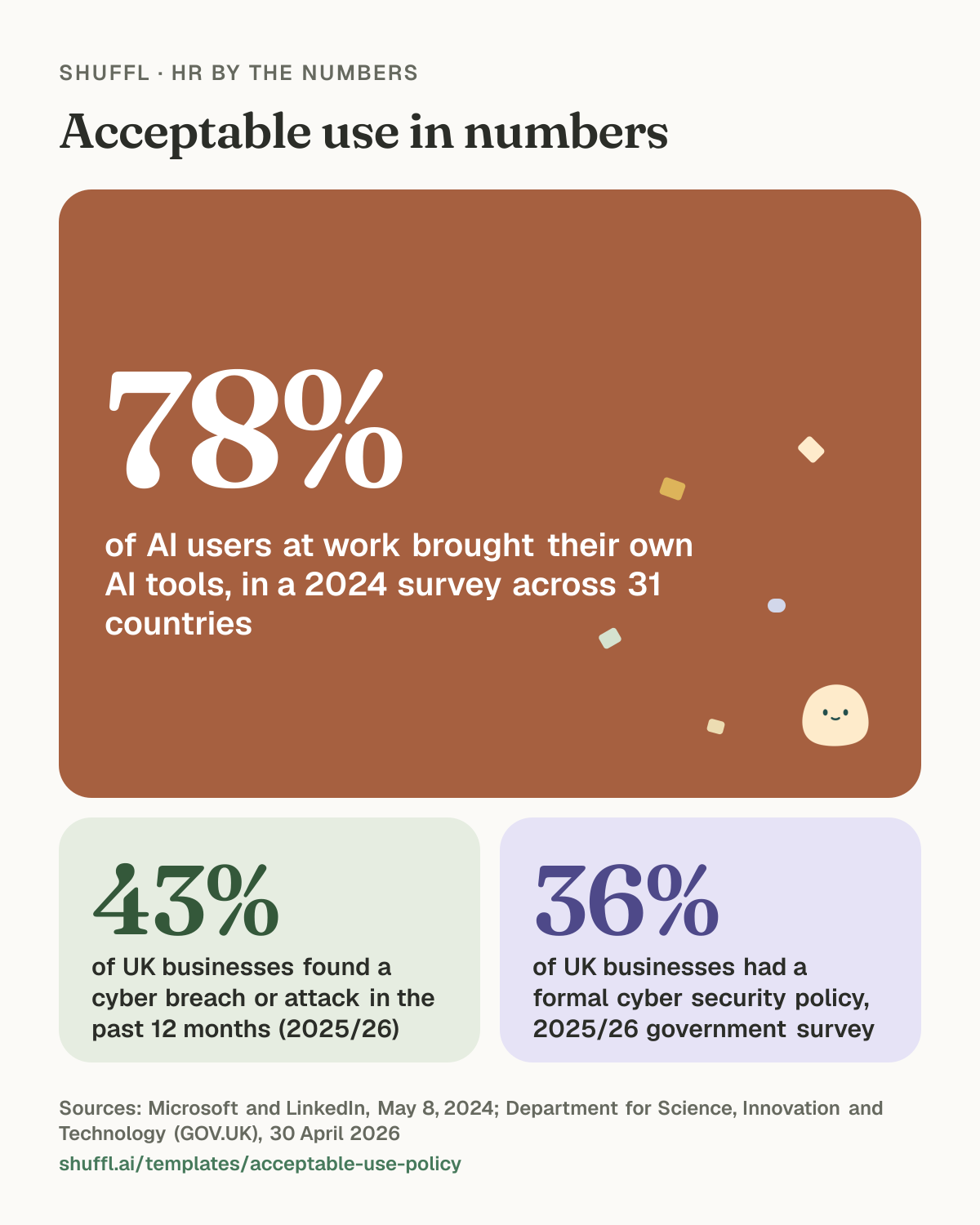
Acceptable use in numbers. 78% of AI users at work brought their own AI tools, in a 2024 survey across 31 countries (Microsoft and LinkedIn, May 8, 2024). 43% of UK businesses found a cyber breach or attack in the past 12 months (2025/26) (Department for Science, Innovation and Technology (GOV.UK), 30 April 2026). 36% of UK businesses had a formal cyber security policy, 2025/26 government survey (Department for Science, Innovation and Technology (GOV.UK), 30 April 2026).
Acceptable use of company systems
Words in [square brackets] are for you to fill in. The policy has every section a real handbook policy has, but no allowances, dates or amounts of its own.
# Acceptable use of company systems

## Purpose
Company devices, accounts and data help us do our work. This policy explains how to use them safely, so our customers' and colleagues' information stays protected.

## Who this covers
Everyone with access to company systems, including [contractors and interns], on company or personal devices.

## Company systems
This covers company laptops and phones, email, chat, cloud tools, code, customer data and any other system or account the company provides.

## Using systems well
- Use company systems for work. Light personal use is fine as long as it does not get in the way of your work or break this policy.
- Use the password manager and two-step sign-in, and never share your accounts.
- Lock your screen when you step away, and keep software up to date.
- Store company files in [approved storage], not on personal accounts.

## What is not allowed
- Accessing data you do not need for your work
- Installing software or browser extensions that are not on [the approved list] without approval
- Sending company or customer data to personal accounts
- Anything illegal, harassing or offensive

## AI tools
Use only [approved AI tools]. Do not put [customer data, personal data or confidential information] into tools that are not approved.

## Personal devices
[Whether personal devices can be used for work, what security they need, and what the company can do to them, for example remove company data if lost.]

## Lost devices and security incidents
Report a lost device, suspicious message or possible data breach to [security contact] straight away, even if you are not sure.

## Monitoring
The company [monitors or may monitor] use of company systems to keep them secure, for example [what is monitored]. Monitoring is limited to what is needed for security and compliance, and the results are seen only by [who].

## When you leave
Return all company devices and stop using company accounts on your last day.

## Responsibilities
- **You:** follow this policy and report problems quickly.
- **Your manager:** make sure your team has the access it needs and no more.
- **IT or security:** keep systems secure, manage access and respond to incidents.

## Where local law differs
If the law where you work gives you more privacy rights, the law applies. These places have their own rules: [list them, or "none"].

## Related policies
Code of conduct, Remote work and hours and Raising a concern.

## About this policy
Owned by [team or person]. Applies in [countries or states]. We may update this policy and will tell you at least [number] days before a change takes effect. This policy is not part of your employment contract.

## Questions
Contact [team or person] at [email or channel].
Check before you publish
Rules that often catch teams out, by place. They are not part of the policy, and not legal advice.
United States
- Connecticut, Delaware and New York require written notice before monitoring email or internet use. Many states stop employers from asking for personal social media passwords. The NLRA protects employees discussing work on social media.
United Kingdom
- Monitoring must be necessary, proportionate and explained to workers under UK GDPR. The ICO expects a data protection impact assessment for intrusive monitoring.
European Union
- GDPR applies to monitoring and to personal devices. In Germany, France and other countries the works council must be consulted before monitoring tools are introduced.
How to adapt it
- Name the AI tools that are approved, and what data must stay out of the rest.
- Say plainly what is monitored and who sees the results.
- Give one contact for lost devices and security incidents.
What the research says
People adopt new tools faster than policies catch up. In a 2024 survey of 31,000 people across 31 countries, 75% of knowledge workers said they used AI at work, and 78% of those AI users were bringing their own AI tools rather than ones their employer provided.1 Without clear rules, company and customer data ends up in tools nobody has checked.
The UK government’s 2025/26 Cyber Security Breaches Survey found 43% of businesses had identified a breach or attack in the previous 12 months, rising to 69% of large businesses. Phishing was the most common, affecting 38%.2 Only 36% had a formal cyber security policy, and 58% of those covered personal devices.2 Only 24% of businesses using or considering AI had security practices for AI risks.2
What the law requires
In the UK, data protection law applies to monitoring staff. The Information Commissioner’s Office says employers must tell workers about any monitoring, except in very exceptional covert cases, and set out its nature, purpose and extent in policy. They need a lawful basis, an impact assessment before likely high-risk monitoring, and the least intrusive way to achieve their purpose.3
Some US states set their own rules on electronic monitoring. New York requires employers that monitor phone calls, email or internet use to give written notice on hiring, get a written or electronic acknowledgment, and post the notice where staff can see it.4 Check the rules in each state and country where your people work before you monitor anything.
Common mistakes
- Banning all AI tools, which pushes people to use personal accounts where you can’t see or protect the data.
- Saying “we may monitor” without saying what is monitored, why, and who sees the results.
- Forgetting personal phones and laptops used for work email and chat.
- Not saying what to do in the first hour after a lost device or a suspicious email, when it matters most.
Common questions
- Should an acceptable use policy cover AI tools?
- Yes. Name the AI tools that are approved, say what data can and can’t go into them, and explain how to ask for a new tool. Surveys show many people already bring their own AI tools to work, so a clear route to approved ones protects your data better than a ban.
- Can employers monitor employees’ work email and devices?
- Often yes, but the rules depend on where people work. In the UK, employers must tell workers about monitoring and keep it proportionate. Some US states, such as New York, require written notice before electronic monitoring.
- What should happen when a work laptop or phone is lost?
- The policy should name one contact and ask people to report it straight away, day or night, so the device can be locked or wiped. Make it clear people won’t be punished for reporting quickly.
Sources
Read on . Laws change, so check the source before you act. This page is general information, not legal advice.
- Microsoft and LinkedIn, AI at Work Is Here. Now Comes the Hard Part (2024 Work Trend Index Annual Report), May 8, 2024. Survey of 31,000 people across 31 countries, February 15 to March 28, 2024.
- Department for Science, Innovation and Technology (GOV.UK), Cyber security breaches survey 2025/2026, 30 April 2026. Official statistics. Survey of 2,112 UK businesses, 1,085 charities and 577 education institutions, fieldwork August to December 2025.
- Information Commissioner’s Office, Employment practices and data protection: monitoring workers, Current page, read October 2026. The ICO notes the guidance is under review following the Data (Use and Access) Act.
- New York State Senate, New York Civil Rights Law section 52-C*2: Employers engaged in electronic monitoring; prior notice required, Current page, read October 2026.